Modbus TCP
The WattWächter Gas exposes a built-in Modbus TCP server. Meter reading, flow rate and energy can be queried directly as Modbus registers — suitable for Home Assistant, openHAB, ioBroker, Loxone, SCADA systems and any other Modbus TCP client.
Its own register block, no SunSpec
A gas meter has nothing in common with a three-phase electricity meter, so the WattWächter Gas does not speak SunSpec. It provides its own register block from address 41000 — see Register block.
Prerequisites
- WattWächter Gas set up and connected to WiFi — if not yet done, follow the setup first
-
A Modbus TCP client on the same network
-
Port 502 (default) reachable between client and WattWächter
Enabling Modbus TCP
Modbus is disabled out of the box and must be enabled once. You have three options:
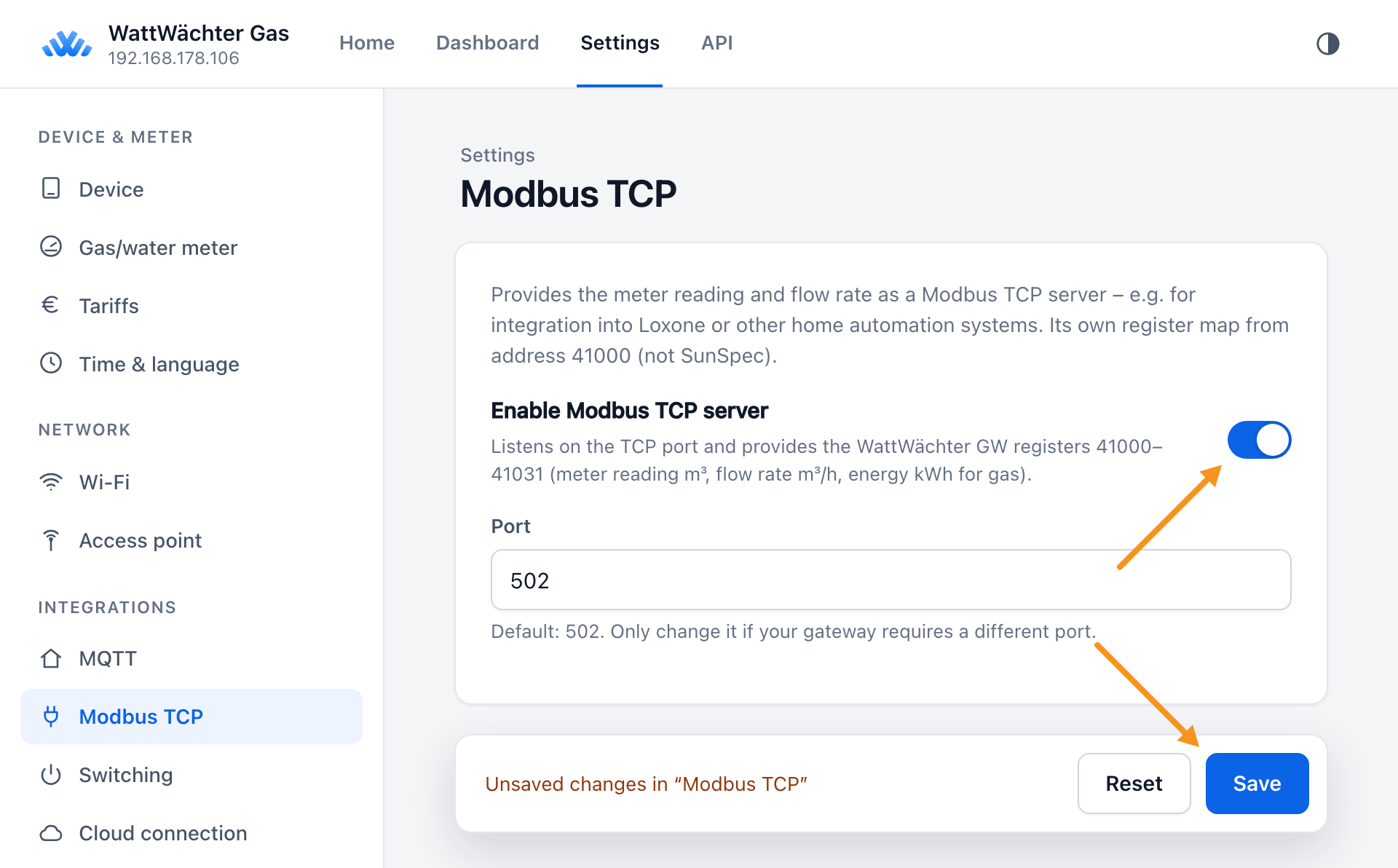
Via the web interface (recommended) — open the WattWächter in your browser, either via its mDNS name http://wattwaechter-XXXXXXXXXXXX.local or via its IP address, and click Settings. Choose the Modbus TCP section (group Integrations), switch Enable Modbus TCP server on and confirm with Save at the bottom.
The Port field is set to 502 and only needs changing if that port is already taken on your network.
Via the API Explorer — open the WattWächter web UI, click "API Explorer", select the POST /api/v1/settings endpoint and send this body:
{ "modbus": { "enable": true, "port": 502 } }
Via curl — if you'd rather do it from the command line:
curl -X POST http://wattwaechter-XXXXXXXXXXXX.local/api/v1/settings \
  -H "Authorization: Bearer WRITE_TOKEN" \
  -H "Content-Type: application/json" \
  -d '{
    "modbus": {
      "enable": true,
      "port": 502
    }
  }'
The change takes effect immediately — no reboot required. You can change the port if 502 is already in use.
API authentication disabled?
If API authentication is off (factory default), you can omit the Authorization header. See REST API.
Connection details
| Parameter | Value |
|---|---|
| Protocol | Modbus TCP |
| Port | 502 (configurable) |
| Supported function codes | 0x03 (Read Holding Registers), 0x04 (Read Input Registers) |
| Max. concurrent clients | 2 |
| Idle timeout | 5 minutes |
| Byte order | Big-endian (Modbus standard) |
| Register base | 41000 (own register block) |
Use the mDNS name (wattwaechter-XXXXXXXXXXXX.local) or the device's IP address as host. How to find the IP is described in the FAQ.
Loxone: IP address only
Not every client resolves mDNS. Loxone cannot handle .local
names — it needs the IP address, backed by a DHCP reservation or a static IP. Details
under Integrations → Loxone.
Address convention
Every address on this page is a protocol address — the exact number that travels in the Modbus frame. 41010 is the number on the wire, not a Modicon reference in the classic "4xxxx" sense.
This matters because clients take that number in different ways:
| Client | Entry for protocol address 41010 | Rule |
|---|---|---|
| pymodbus, Home Assistant, openHAB, Node-RED, Loxone, ioBroker | 41010 |
unchanged |
modpoll at its default setting, and other tools that count from 1 |
41011 |
+1 — or switch the tool to zero-based counting (modpoll: -0) |
Siemens S7 MB_CLIENT (parameter MB_DATA_ADDR) |
441011 |
+400001 |
Why the S7 is special: MB_DATA_ADDR expects a Modicon reference and subtracts 40001 from it — within the range 40001–49999, which only reaches protocol address 9998. Our addresses therefore require the extended range from 400001, from which the block subtracts 400001. Details under Integrations → Siemens S7.
If your client returns Modbus exception 02 (illegal data address) or reads nothing but zeros, this conversion is almost always the cause — see Troubleshooting.
One-shot self-test
Read 2 registers from protocol address 41000. If you get back the identifier WWGW,
your addressing is right — and every other address on this page converts by the same rule.
Register block
The WattWächter Gas provides its own register block at protocol addresses 41000–41031; all other addresses are answered with Modbus exception 02 (illegal data address). Enabling, port and connection data are as described above.
Gas and water use the same addresses — when you change the medium, the addresses stay the same. Med tells you which medium is set.
| Address | Field | Type | Unit | Meaning |
|---|---|---|---|---|
| 41000 | Magic |
char[4] | — | Identifier WWGW |
| 41002 | Ver |
uint16 | — | Layout version, currently 1 |
| 41003 | L |
uint16 | — | Length of the data part in registers, currently 22 |
| 41004 | Ser |
uint8[6] | — | Serial number (MAC address) |
| 41007 | Fw |
uint32 | — | Firmware version (major, minor and patch in one byte each, major on top) |
| 41010 | Vol |
float32 | m³ | Meter reading |
| 41012 | VolFlw |
float32 | m³/h | Flow rate |
| 41014 | Ene |
float32 | kWh | Energy counter (gas only, NaN for water) |
| 41016 | EneF |
float32 | kWh/m³ | Conversion factor Z-number × calorific value (gas only, NaN for water) |
| 41018 | PlsVol |
float32 | m³ | Volume per pulse |
| 41020 | Pwr |
float32 | kW | Power = flow rate × EneF (gas only, NaN for water) |
| 41022 | Pls |
uint32 | — | Pulses since the meter reading was entered |
| 41024 | Med |
uint16 | — | Medium: 0 = gas, 1 = water |
| 41025 | Src |
uint16 | — | Sensor: 1 = magnetic field, 2 = inductive |
| 41026 | St |
uint16 | — | Status (bit field): bit 0 = sensor responding, bit 1 = flow rate forced to 0, bit 2 = no pulse since start-up |
| 41027 | StpRev |
uint16 | — | Pulses per revolution (6) |
| 41028 | MedStr |
char[8] | — | Medium as text (gas / water) |
All readings are float32, big-endian with the high register first — there are no scale factors. Unused values carry NaN. Once the server is running, the web interface lists the registers with their current values under Settings → Modbus TCP.
Ene is a real energy counter: every m³ counts with the conversion factor that applied when it was used. If you enter a different calorific value with a new tariff, it only affects future consumption, and correcting the meter reading does not change Ene. So you can read Ene directly as a consumption counter. For the meter reading in kWh at today's factor, use Vol × EneF.
Status endpoint
The REST endpoint /api/v1/modbus/status shows whether the server is running, how many clients are connected and which values are currently in the registers — handy for setting up a Modbus client or tracking down a wrong address:
curl http://wattwaechter-XXXXXXXXXXXX.local/api/v1/modbus/status \
  -H "Authorization: Bearer READ_TOKEN"
Response (abridged):
{
  "enabled": true,
  "running": true,
  "port": 502,
  "active_connections": 1,
  "registers": [
    {
      "register": 41010,
      "name": "Vol",
      "obis": "7-0:3.0.0",
      "value": 1234.5670,
      "unit": "m³",
      "valid": true,
      "raw": 1150964261,
      "scale_factor": 0,
      "scale_register": 0,
      "derived": false
    },
    {
      "register": 41012,
      "name": "VolFlw",
      "obis": "7-0:43.0.0",
      "value": 0.3500,
      "unit": "m³/h",
      "valid": true,
      "raw": 1051931443,
      "scale_factor": 0,
      "scale_register": 0,
      "derived": false
    },
    {
      "register": 41024,
      "name": "Med",
      "obis": "",
      "value": 0.0000,
      "unit": "",
      "valid": true,
      "raw": 0,
      "scale_factor": 0,
      "scale_register": 0,
      "derived": true
    }
  ]
}
The fields mean the same as on the WattWächter Plus, with three differences: scale_factor and scale_register are always 0, because the register block has no scaling. For float32 values, raw is the bit pattern of the two registers as an unsigned number. derived is true for every field the device builds from its settings and meter state — only Vol and VolFlw have an OBIS code. If the server is off, registers is empty.
Troubleshooting
Connection refused / timeout
- Is Modbus enabled in settings? Check
/api/v1/modbus/status→enabled: true,running: true. - Are you using the correct port? Default is 502.
- Is the client on the same network/subnet? Guest WiFi usually blocks client-to-client traffic.
- At most 2 concurrent connections are supported. Additional clients are rejected until a connection closes or times out after 5 min idle.
Registers only return zeros
Almost always a question of the address convention. The WattWächter answers addresses outside its register block with Modbus exception 02 (illegal data address) — deliberately, so that a wrong address fails loudly instead of returning plausible-looking numbers. Many clients, however, surface that exception only briefly or not at all and simply leave their data area at 0.
- Run the self-test: 2 registers from protocol address 41000 must return the identifier
WWGW. If that fails, the conversion is at fault — not the device. - Make your client's error output latch. On PLC blocks,
ERRORandSTATUSare often set for a single scan cycle and are otherwise never seen. - Is the connection up at all?
active_connectionsin/api/v1/modbus/statusshows whether your client got through.
Port 502 already in use
Already running another device on port 502? Configure an alternative port, e.g. 1502:
curl -X POST http://wattwaechter-XXXXXXXXXXXX.local/api/v1/settings \
  -H "Authorization: Bearer WRITE_TOKEN" \
  -H "Content-Type: application/json" \
  -d '{"modbus": {"port": 1502}}'