Siemens S7
Own register block, no SunSpec
Unlike the WattWächter Plus, the WattWächter Gas does not speak SunSpec — it provides its own register block at protocol addresses 41000–41031, see Modbus TCP → Register block. All examples on this page read that block.
The WattWächter Gas connects directly to a SIMATIC S7-1200 or S7-1500 through its Modbus TCP server. All you need is the MB_CLIENT instruction from the TIA Portal library — no add-on module, no CP.
First things first: the address conversion
MB_CLIENT does not expect a protocol address at MB_DATA_ADDR — it expects a
Modicon reference, and converts it before sending. Entering the addresses from the
register table unchanged reads a
completely different location and returns empty registers. See
Converting addresses.
Prerequisites
-
WattWächter Gas set up and connected to Wi-Fi
-
Modbus TCP enabled on the WattWächter — web interface → Settings → Modbus TCP → Enable Modbus TCP server → Save. Other ways under Modbus TCP → Enabling
- S7-1200 or S7-1500 with an on-board PROFINET interface on the same network
- TIA Portal with the
MB_CLIENTinstruction (Communication → Others → MODBUS TCP) - A static IP address for the WattWächter — via a DHCP reservation in your router or configured on the device. How to find the current IP is described in the FAQ
The Loxone caveat applies here too
The S7 does not resolve mDNS/.local names. The connection parameters need the
IP address, not wattwaechter-XXXXXXXXXXXX.local.
Converting addresses
Every address in our documentation is a protocol address — the number that travels in the Modbus frame. MB_DATA_ADDR takes a Modicon reference instead and subtracts from it:
Entry at MB_DATA_ADDR |
Protocol address sent | Function code at MB_MODE = 0 |
|---|---|---|
| 40001 … 49999 | entry − 40001 | 0x03 Read Holding Registers |
| 400001 … 465535 | entry − 400001 | 0x03 Read Holding Registers |
The range 40001–49999 therefore only reaches protocol address 9998 — it is unusable for the WattWächter's registers. The only rule that applies is:
MB_DATA_ADDR = protocol address + 400001
| What | Protocol address | MB_DATA_ADDR |
|---|---|---|
ID "WWGW", start of the block |
41000 | 441001 |
Meter reading Vol |
41010 | 441011 |
Flow rate VolFlw |
41012 | 441013 |
Energy Ene (gas only) |
41014 | 441015 |
Power Pwr (gas only) |
41020 | 441021 |
Pulses Pls |
41022 | 441023 |
Self-test first, everything else after
Start small: MB_DATA_ADDR = 441001, MB_DATA_LEN = 2. The two words must hold
16#5757 and 16#4757 (decimal 22359 and 18263) — that is the ID "WWGW" at
protocol address 41000. If it arrives, your addressing is correct and you can widen to
the full block. If it does not, the conversion is at fault, not the device.
Step 1 — Create the connection parameters
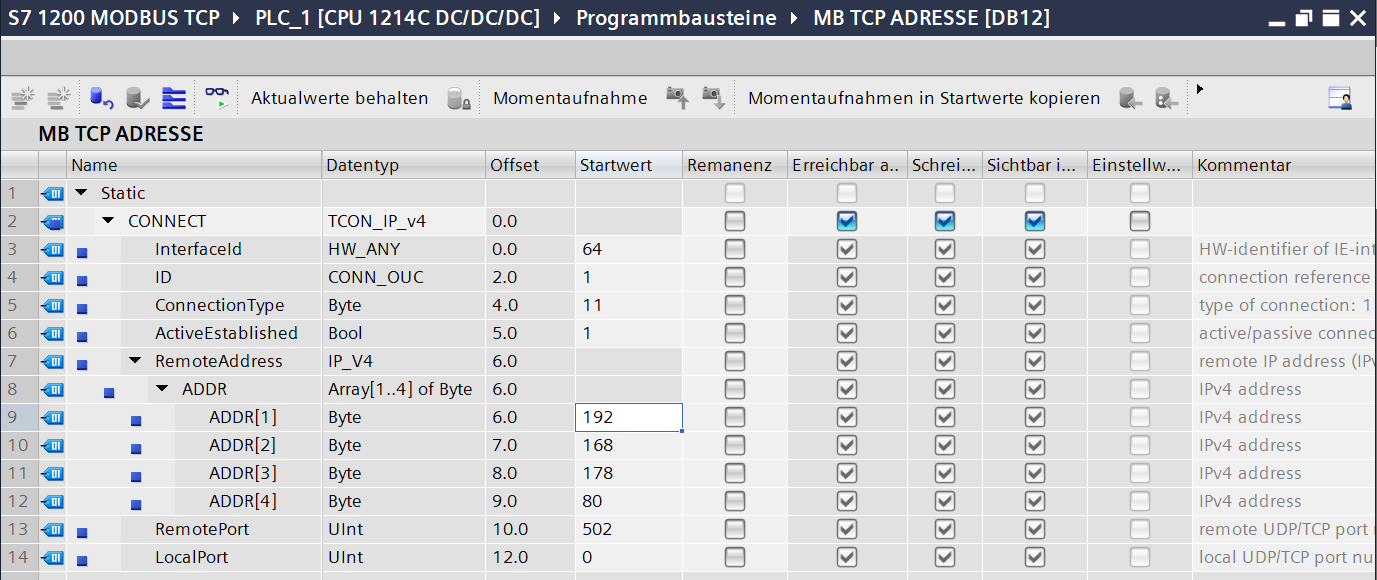
Create a data block holding a variable of system data type TCON_IP_v4 (e.g. DB12, variable CONNECT). It describes the TCP connection to the WattWächter:
| Field | Value | Note |
|---|---|---|
InterfaceId |
hardware identifier of the PROFINET interface | Device configuration → Properties → Hardware identifier |
ID |
freely chosen, 1 … 4095 |
unique across the project; several MB_CLIENT calls sharing an ID share one connection |
ConnectionType |
16#0B |
TCP/IPv4 |
ActiveEstablished |
TRUE |
the CPU opens the connection |
RemoteAddress.ADDR |
the WattWächter's IP, e.g. 192.168.178.106 |
four individual bytes |
RemotePort |
502 |
or the alternative port from the device settings |
LocalPort |
0 |
assigned by the CPU |
In the block view it looks like this (German TIA Portal) — TIA shows ConnectionType in decimal as 11 and ActiveEstablished as 1:
Step 2 — Create the data block for the registers
Create a second data block for the registers you read, e.g. DB11. The WattWächter Gas's entire register block — 32 registers, 64 bytes — fits into a single read request. Create the variables in exactly this order; every register then lands in the matching variable by itself, and the measurements are available directly as Real:
| Name | Data type | Offset | Protocol address | Content |
|---|---|---|---|---|
Magic |
DWord |
0.0 |
41000–41001 | ID "WWGW" = 16#5757_4757 |
Ver |
UInt |
4.0 |
41002 | layout version, currently 1 |
L |
UInt |
6.0 |
41003 | length of the data part in registers, currently 22 |
Ser |
Array[0..5] of Byte |
8.0 |
41004–41006 | serial number (MAC address) |
Fw |
DWord |
14.0 |
41007–41008 | firmware version |
Reserve1 |
Word |
18.0 |
41009 | reserved |
Vol |
Real |
20.0 |
41010–41011 | meter reading in m³ |
VolFlw |
Real |
24.0 |
41012–41013 | flow rate in m³/h |
Ene |
Real |
28.0 |
41014–41015 | energy in kWh (gas only, NaN for water) |
EneF |
Real |
32.0 |
41016–41017 | conversion factor, volume correction factor × calorific value, in kWh/m³ (gas only, NaN for water) |
PlsVol |
Real |
36.0 |
41018–41019 | volume per pulse in m³ |
Pwr |
Real |
40.0 |
41020–41021 | power in kW (gas only, NaN for water) |
Pls |
UDInt |
44.0 |
41022–41023 | pulses since the meter reading was entered |
Med |
UInt |
48.0 |
41024 | medium: 0 = gas, 1 = water |
Src |
UInt |
50.0 |
41025 | sensor: 1 = magnetic field, 2 = inductive |
St |
Word |
52.0 |
41026 | status (bit field), see step 4 |
StpRev |
UInt |
54.0 |
41027 | pulses per revolution (6) |
MedStr |
Array[0..7] of Char |
56.0 |
41028–41031 | medium as text (gas / water) |
The offset is always (protocol address − 41000) × 2. Both reserved fields must be included — leave one out and everything after it shifts.
Turn off optimized block access
MB_DATA_PTR needs an ANY/pointer expression such as P#DB11.DBX0.0 WORD 32. That can only
be formed on a data block without optimized block access.
Right-click the DB → Properties → Attributes → clear the Optimized block
access checkbox. The block view then shows an Offset column with 0.0, 2.0,
4.0 … — that is how you know it worked. The column fills in only after compiling;
until then it shows .... Compare the column with the table
above: Vol must be at 20.0, MedStr at 56.0.
Step 3 — Call MB_CLIENT
Drag MB_CLIENT from the Instructions task card (Communication → Others → MODBUS TCP) into a network of the cyclic program, e.g. Main [OB1]. TIA then asks for an instance data block: choose Single instance, assign a number manually if you like (e.g. 10) and confirm with OK.
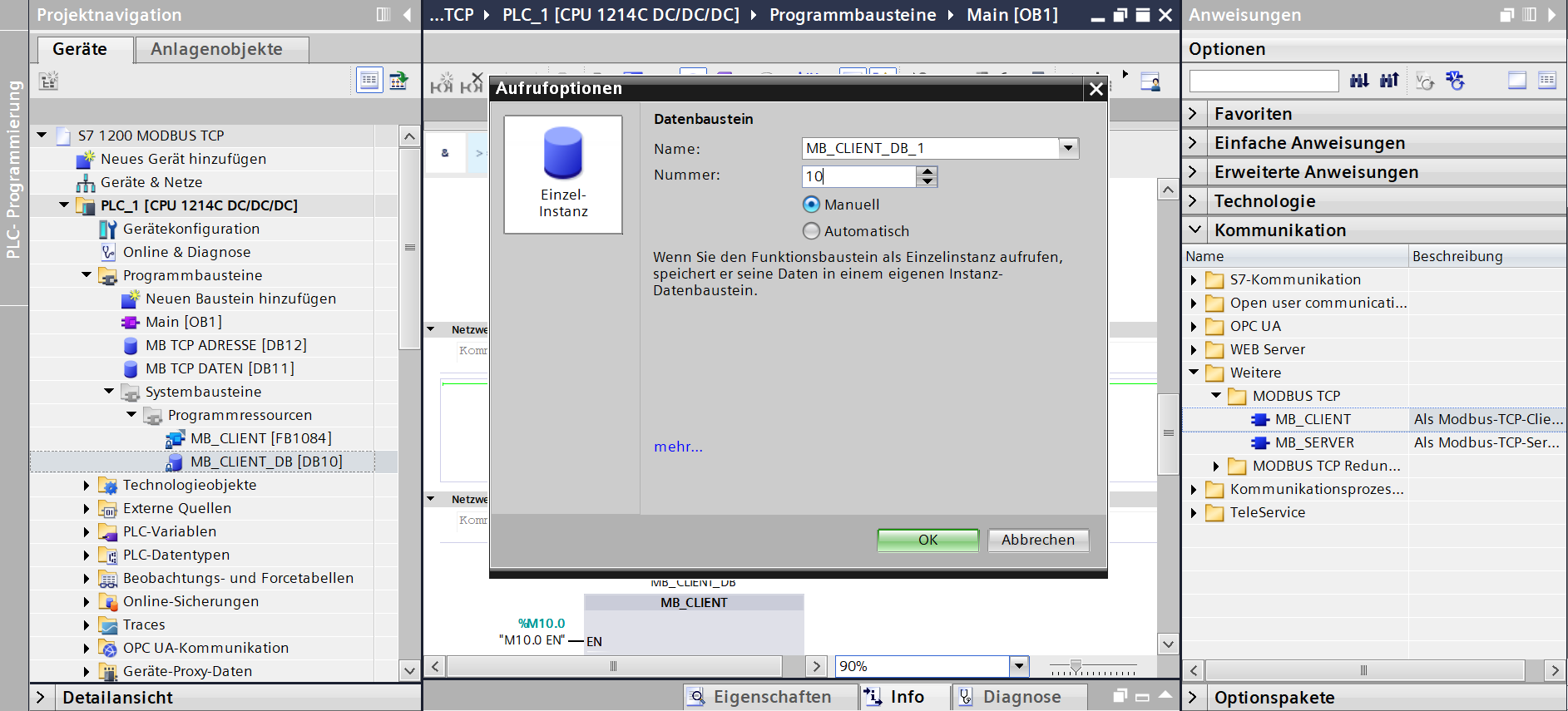
TIA then creates the function block MB_CLIENT (FB1084) under System blocks → Program resources and the instance DB MB_CLIENT_DB. You do not need to touch either of them.
Then parameterise the call like this:
| Parameter | Value | Meaning |
|---|---|---|
REQ |
clock memory bit or your own timing | starts a request; edge-triggered |
DISCONNECT |
FALSE |
open the connection and keep it |
MB_MODE |
0 |
read |
MB_DATA_ADDR |
441001 |
protocol address 41000 — see Converting addresses |
MB_DATA_LEN |
32 |
number of registers — the whole block 41000–41031 |
MB_DATA_PTR |
P#DB11.DBX0.0 WORD 32 |
destination area from step 2 — the whole DB |
CONNECT |
variable CONNECT from DB12 |
connection parameters from step 1 |
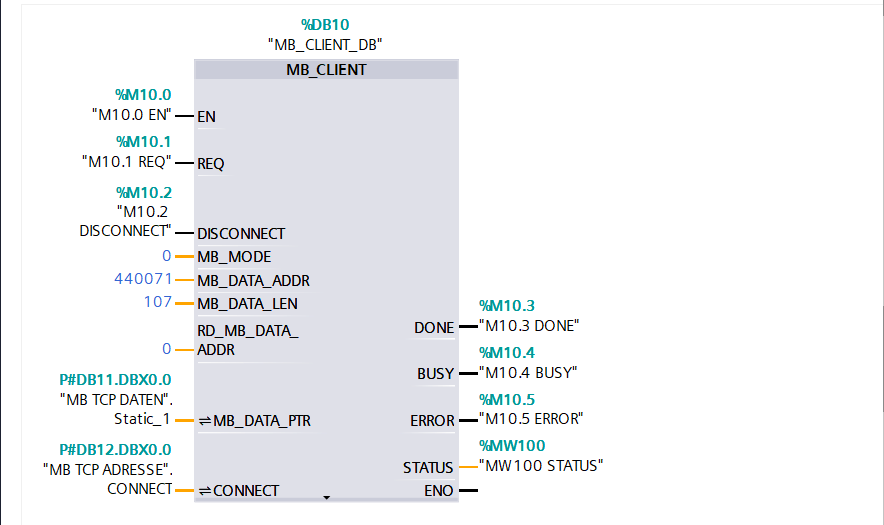
Outputs: DONE, BUSY, ERROR, STATUS.
Fully wired, the call looks like this (German TIA Portal) — REQ, DISCONNECT and the outputs are on memory bits here. The screenshot was taken with a WattWächter Plus: in your project MB_DATA_ADDR is 441001, MB_DATA_LEN is 32 and MB_DATA_PTR is P#DB11.DBX0.0 WORD 32.
Wire CONNECT symbolically, give MB_DATA_PTR a length
Drag the variable CONNECT from the block view straight onto the input. TIA then shows
the absolute address above it, e.g. P#DB12.DBX0.0. Do not type that display in by
hand: without a length the pointer covers a single bit only. For MB_DATA_PTR the
length therefore has to be included: P#DB11.DBX0.0 WORD 32 covers all variables from
step 2.
Keep EN enabled, pulse REQ
MB_CLIENT must be processed in every scan cycle until DONE or ERROR is set.
A request is started via REQ, not via EN. If the enable input drops in between,
BUSY stays set, DONE never arrives, and the data block stays empty.
Several WattWächters on one S7
Each WattWächter needs its own MB_CLIENT call with its own instance DB, its own ID and
its own TCON_IP_v4. An S7-1200 keeps at most 8 Modbus TCP connections open at the
same time. To poll more devices than that, work through the calls one after another and
only move on once the active call has reported DONE or ERROR — taking the enable away
from a running request gives you the stuck BUSY from the note above.
The limits of other CPUs (S7-1200 G2, S7-1500) are in the respective data sheet under
Open User Communication.
Reading the whole block every 5 s is a good starting point — that keeps the flow rate current as well. If you only need the meter reading, 30 s is enough.
Step 4 — Use the values
After every DONE the values are available directly in DB11 — no scale factor, no conversion:
| Value | Protocol address | Variable | Type |
|---|---|---|---|
| Meter reading (m³) | 41010 | "DB11".Vol |
Real |
| Flow rate (m³/h) | 41012 | "DB11".VolFlw |
Real |
| Energy (kWh) | 41014 | "DB11".Ene |
Real |
| Power (kW) | 41020 | "DB11".Pwr |
Real |
| Pulses since the meter reading was entered | 41022 | "DB11".Pls |
UDInt |
| Sensor responding | 41026, bit 0 | "DB11".St.%X0 |
Bool |
| Flow rate forced to 0 (pulses overdue) | 41026, bit 1 | "DB11".St.%X1 |
Bool |
| No pulse since start-up | 41026, bit 2 | "DB11".St.%X2 |
Bool |
Byte order. The WattWächter sends 32-bit values big-endian with the high register first (ABCD). That is exactly how the S7 stores Real, DWord and UDInt — MB_CLIENT copies the bytes into the DB unchanged, no word or byte swapping needed.
Check the ID. If "DB11".Magic does not hold 16#5757_4757 ("WWGW"), the program is not reading the WattWächter Gas's block — do not process the values. "DB11".Ver is the layout version; it is only increased should the layout ever change.
Firmware version. "DB11".Fw carries major, minor and patch in one byte each, major on top: 16#0001_0300 is firmware 1.3.0.
Values not delivered are NaN. Ene, EneF and Pwr only exist for gas; for water they hold NaN. Until the server has filled in the measurements for the first time after start-up, Vol, VolFlw and PlsVol hold NaN as well. A Real holding NaN makes arithmetic operations return ENO = FALSE — check such values before processing them, e.g. with the OK instruction (check validity).
An array instead of individual variables. If you prefer reading into an Array[0..31] of Word, a register sits at index protocol address − 41000. You then assemble a Real from two words, the high word first. DWORD_TO_REAL only takes over the bit pattern and does not convert anything:
// "DB11".Data: Array[0..31] of Word, read from MB_DATA_ADDR = 441001
// "DB11".MeterReading: Real
// meter reading Vol = protocol address 41010/41011 = index [10]/[11]
"DB11".MeterReading := DWORD_TO_REAL(SHL(IN := WORD_TO_DWORD("DB11".Data[10]), N := 16)
                                     OR WORD_TO_DWORD("DB11".Data[11]));
Troubleshooting
All registers stay at 0
By far the most common cause: the address conversion. With
MB_DATA_ADDR set to 41011 instead of 441011, the S7 sends protocol address 1010 —
there is nothing there on the WattWächter, and the device answers with Modbus
exception 02. You get the same exception with addresses from a guide for the
WattWächter Plus (from 440001) or when the start address plus MB_DATA_LEN reaches
beyond 41031: the WattWächter Gas only answers 41000–41031.
Run the self-test with 441001 and length 2. And make
ERROR and STATUS latch in a watch table — both are set for a single scan cycle
and are otherwise never visible. A STATUS starting with 16#838 means the
WattWächter answered the request with a Modbus exception.
BUSY stays set, DONE never arrives
Is MB_CLIENT really processed every scan cycle? A dropping enable input leaves the
request hanging. REQ is the start signal; EN must stay asserted throughout.
Values like 16#7001 … 16#7006 at STATUS are not errors but intermediate
states during processing.
MB_DATA_PTR cannot be entered
The destination block still has optimized block access. Clear the checkbox in the block properties — see step 2.
The connection never comes up
- Is Modbus enabled on the WattWächter? Check
/api/v1/modbus/status→enabled: true,running: true. - Does
RemoteAddresshold an IP address and not a.localname? - Is
RemotePortcorrect (default502) andActiveEstablished = TRUE? - The WattWächter allows at most 2 concurrent Modbus connections. If a test with
modpoll, Home Assistant or Loxone is still running, close that one first. - Is the
IDinTCON_IP_v4unique across the project?
The meter reading is a nonsensical number
The variables in DB11 do not match the register block — usually a reserved field is
missing or a data type is wrong, and everything after it has shifted. Compare the
Offset column with the table in step 2:
Vol must be at 20.0. If you read into an Array of Word or Int, you first have to
assemble the two words into a Real — see step 4.
More points in the Modbus TCP troubleshooting section.