WattWächter TTL
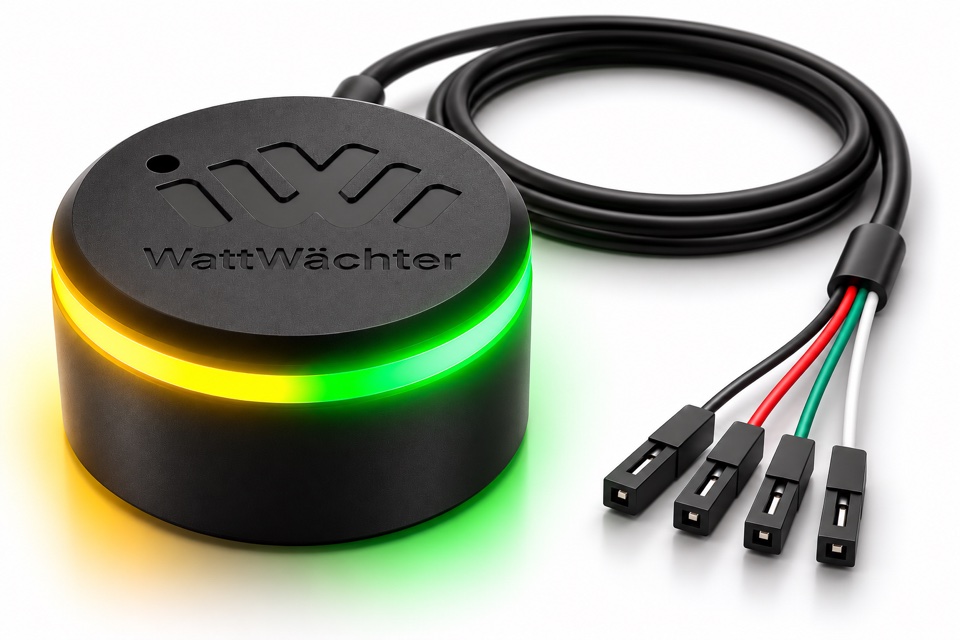
The WattWächter TTL is a pure IR reading head for makers and tinkerers. It reads your electricity meter via the optical interface and passes the data on unchanged as a TTL serial signal (RX/TX). Your own electronics, such as an ESP32 or a Raspberry Pi, do the evaluation. Since the head does not evaluate anything itself, it is not limited to specific meter models — see Supported meters.
Older TTL with a fixed cable?
These pages describe the current TTL with a USB-C socket. If you have the older head with a permanently attached cable and a 3D-printed housing, you will find the wire colors and specifications under Older version.
Use cases
The WattWächter TTL is suited for your own projects with:
- ESP32 with ESPHome, Arduino or your own firmware
- Raspberry Pi via the GPIO UART
- D1 Mini / ESP8266 with Tasmota
- Arduino and other microcontrollers with a TTL interface
- WattWächter Tasmota Gen.1: up to two additional TTL (cascading)
WattWächter Tasmota Gen 2
The WattWächter Tasmota Gen 2 no longer supports connecting a WattWächter TTL. Cascading is only possible with the first generation of the WattWächter Tasmota.
Reading on a PC, Mac or Home Assistant server?
That is what the WattWächter USB is for: same housing, but with a built-in USB converter.
Step-by-step guides are available for ESPHome (ESP32 → Home Assistant) and the Raspberry Pi, code examples under Arduino and Python.
Features
- Standard optics according to DIN EN 62056-21, for SML and D0 meters (IEC 62056-21)
- TTL interface with RX / TX, crossover already inside the head (connect 1:1)
- Operating voltage 3–5 V, built-in reverse polarity protection
- Pluggable cable: USB-C plug at the head, 4 Dupont connectors to plug onto the pin header, no soldering
- Ring magnet: mounting without tools and without touching the meter
- Two status LEDs in the light ring show receiving and sending
The USB-C socket is not a USB interface
The socket only carries the supply and the TTL signals RX/TX. On a PC, Mac or charger the head does not work, but nothing gets damaged either. Use the cable supplied.
Status LEDs
| LED | Meaning |
|---|---|
| Green (right) | Data received from the meter (RX) |
| Yellow (left) | Data sent to the meter (TX) |
If the green LED flashes regularly (usually every 1–2 seconds), the head is positioned correctly and the meter is sending. Meters using IEC 62056-21 stay silent until your software requests data.
Connection
The WattWächter TTL connects to your evaluation electronics via 4 wires with Dupont connectors (1:1 wiring). Data is transmitted serially, usually at 9600 baud (SML).
For the full pinout and wiring, see Connection → Wiring.
Package contents
- WattWächter TTL reading head
- Connection cable USB-C to 4 × Dupont, 1 m
- Quick-start guide
Additionally required:
- Evaluation electronics (ESP32, Raspberry Pi, D1 Mini, etc.)
- Custom firmware/software
- A prepared electricity meter (PIN from grid operator)
Technical specifications
| Property | Specification |
|---|---|
| Optical interface | IR according to DIN EN 62056-21 |
| Protocols | SML, D0 / IEC 62056-21 (passed through transparently) |
| Interface | TTL (UART), RX / TX |
| Power supply | DC 3–5 V, reverse polarity protection |
| Signal level | equals the supply voltage |
| Connector on the device | USB-C socket (TTL signals, not USB) |
| Cable | USB-C to 4 × Dupont, 1 m, included |
| Mounting | Ring magnet |
| Dimensions (D × H) | Ø 32.5 mm × 18.5 mm |
| Weight | 22 g (reading head without cable) |
| Operating temperature | 0 °C – 40 °C |
| Protection class | IP20, indoor use only |
| Conformity | CE, RoHS |
Next step
➜ Connection: plug in the cable, attach the head and read the data.